Designing for the menu bar
What I learned building two apps that live in a strip about 22 points tall. One icon carries all the state, overlays let your clicks fall through, and the hardest design decision is when to ask a question at all.
The menu bar gives you roughly 22 points of height and maybe 20 points of width before you start taking space from someone else. That's your whole storefront. I've now shipped two apps that live up there, meetre for meeting transcripts and TaskAlarm for reminders, and both taught me the same thing from opposite directions: the smaller the surface, the more every pixel has to earn its rent.
A website gets a hero section. A menu bar app gets one glyph, and that glyph has to answer a question people ask a hundred times a day without noticing they asked it: is everything fine?
One icon, every state
In meetre the status item is the only place where color is allowed to carry meaning at a glance. Idle, it's a monochrome sparkle that follows the menu bar like every other template icon. Recording, it turns into a red filled record symbol with a running timer next to it. While processing, it takes on the color of whatever step it's in (blue for transcribing, orange for working out speakers) and says something like "Transcribing 42%". When it's finished, a green check and the word "Done" sit there for five seconds and then quietly leave. If something failed, an amber triangle stays until you open the popover and look.
That's five states, and you can read every one of them from across the room. The rule behind it is stricter than it looks: the colored symbol is a non-template image, but the text stays template so it still matches your light or dark menu bar. And the recording red appears nowhere else in the entire app. Not on a delete button, not on an error. If you see that red, you are being recorded. I want that association to be so boring and reliable that nobody ever has to think about it.
TaskAlarm does the same job with a face. The smiley in the menu bar is green when everything's clear, amber when something's due, red when you missed something. Red is also the only time it stops smiling. Everything else, it's on your side.
In a menu bar app the icon isn't decoration. It's the entire interface for the ninety-nine times you don't click it.
Fixed width, honest height
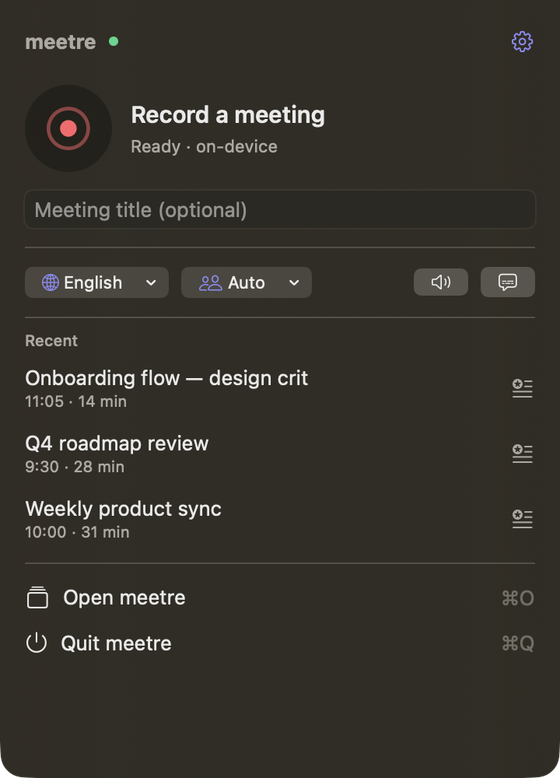
When you do click, the meetre popover is exactly 360 points wide, every time, and its height fits the content up to 560. I fixed the width on purpose. A popover that changes width between states makes your eye re-measure the whole thing, and that tiny jolt is exactly the kind of noise this app is supposed to avoid.
The design rule I wrote for it is "one obvious action per surface." In the popover that action is the record button, a 56 point circle that's clearly the biggest thing in the panel. Language, speaker count and system audio sit underneath as compact menus, and they only show while idle. Once you're recording they disappear, because there's nothing useful to change mid-meeting and three dropdowns next to a running timer only invite fiddling.
Overlays your mouse walks straight through
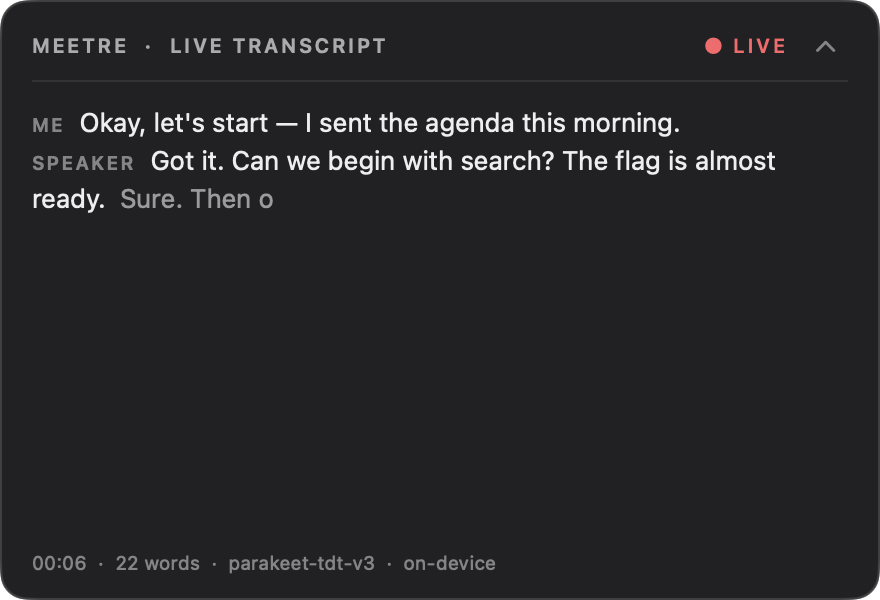
The part that took the most iterations was the live transcript. It's a floating panel in the top right, 440 points wide, 14 points from the edge of the screen. The problem with any floating panel during a call is obvious the second you use it: it's sitting on top of the exact window you need to click.
So the panel is click-through. Your clicks fall straight through it to whatever's underneath, except over its header buttons. Getting that to work meant the panel only accepts mouse events while the pointer is actually over the minimize chevron, and ignores them everywhere else.

It also starts collapsed. By default you only get that slim header strip, 46 points tall. One click expands it to 300. I went back and forth on this for a while, because the expanded version is clearly the better screenshot. But the minimized one is the better product. Most people don't want to watch their own meeting scroll by. They want to know it's being captured, and a strip that says so is enough. The state is remembered, so if you're one of the people who likes it open, it stays open.
The overlays are always dark, regardless of your system appearance, so they read over any wallpaper or app. And they fade in over 0.35 seconds and out over 0.6. They never slide. Something sliding in from the edge of the screen while you're talking to a client feels like a notification demanding attention. A fade feels like it was always there.
The hardest part is knowing when to ask
meetre can notice when a Teams call starts (a Teams process grabbing the microphone) and ask whether you want to record it. That's genuinely useful and also very easy to get wrong. A question at the wrong moment is just a pop-up.
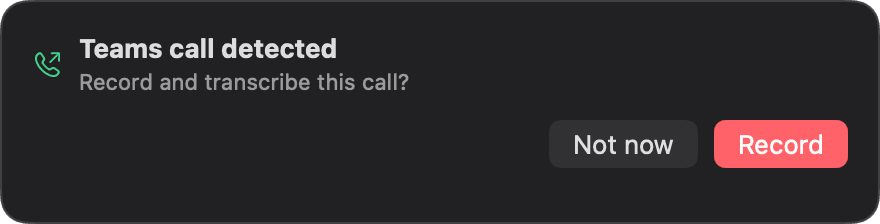
So the prompt is small, anchored to the status item, and it has two buttons with plain verbs: "Not now" and "Record." Ignore it, and nothing happens.
The other end of the call was trickier. When the call ends, meetre asks whether to stop and transcribe. If you don't answer, it keeps recording. That sounds backwards until you think about why someone wouldn't answer: they're still talking, or they've jumped straight into a second call, or they're walking to the kitchen. Losing the end of a meeting because you didn't click a button in time would be the worst possible failure for a tool whose whole job is remembering. An extra minute of silence at the end of a recording costs nothing. And if you stop recording some other way, or the call picks back up, the question simply closes itself.
TaskAlarm has the same tension with alarms. A missed task waits five minutes of grace before it turns red, plays a soft ding-dong and shakes once. Then it repeats every few minutes until you handle it. It's insistent without being a siren, because a reminder app that panics teaches you to ignore it.
Quiet is a feature you have to defend
The first principle in meetre's design book is "Quiet until needed." The only thing that's allowed to loop forever is the pulsing recording dot, because that's the one state you must never forget about. Everything else animates once and settles.
Writing that down was easy. Defending it was harder, mostly against myself. Every new feature arrives wanting a badge, a banner, a little bounce to announce it exists. Most of them don't get one. The test I use is simple: would I want this to happen while I'm presenting to a client with my screen shared? If not, it doesn't move.
I spend my days designing websites that are meant to be looked at, and it turns out the most satisfying thing I've built this year is an icon you're supposed to forget is there.